Your brand footage in. A campaign-ready video out.
SkyCanvas writes the concept and editable script, combines your selected footage with generated scenes, and builds the final cut while completed takes appear in a live editor. Create layered designs, tracked QR codes and short links in the same workspace.
Create your Brand Kit once, then use it across videos and designs.
Free to startEditable scriptsLive take reviewTracked calls to action
One connected campaign
See the SkyCanvas workflow in action
Turn an idea into a brand-ready design, add a tracked call to action, publish it and see how people respond.
Layers
Footer
Location Line
URL
Scan Label
QR Code
QR Card
Free Entry Pill
Headline Market
Headline Night
Eyebrow
Top Scrim
Pier Night Photo
+ 9 more layers
This flier came from one typed sentence. Every piece of it is still a layer you can move, restyle, or delete.
Built for the taqueria, the open mic night, the pop-up, the launch. If you have something to promote and no designer on payroll, this is your canvas.
Four tools, one campaign
Everything between your idea and their screen
Script it, design it, link it and measure it in one brand-aware workspace.
Take 4 ready
AI promo video generator
Select your Brand Kit footage and SkyCanvas writes the concept, hook and full scene-by-scene script. Edit the plan before generation, watch completed takes appear in the live editor, force stop when needed, and finish with your tracked QR link.
Turn long URLs into crisp skyc.online links. Each link comes with click tracking, conversion tracking that counts the signups and sales your link brings in, and its own QR code, which you can restyle with gradients, dot shapes and transparent backgrounds.
A full design studio in your browser, with layers, fonts, shapes and photo tools. Describe the design you need, like a flier, poster or social post, and watch an editable composition assemble itself in your brand colors, QR included.
A link-in-bio profile that feels like you: avatar, bio, and social buttons with official brand icons. One clean URL to put everywhere your audience looks.
Videos, designs, tracked links and results live together, so the next action is always close by.
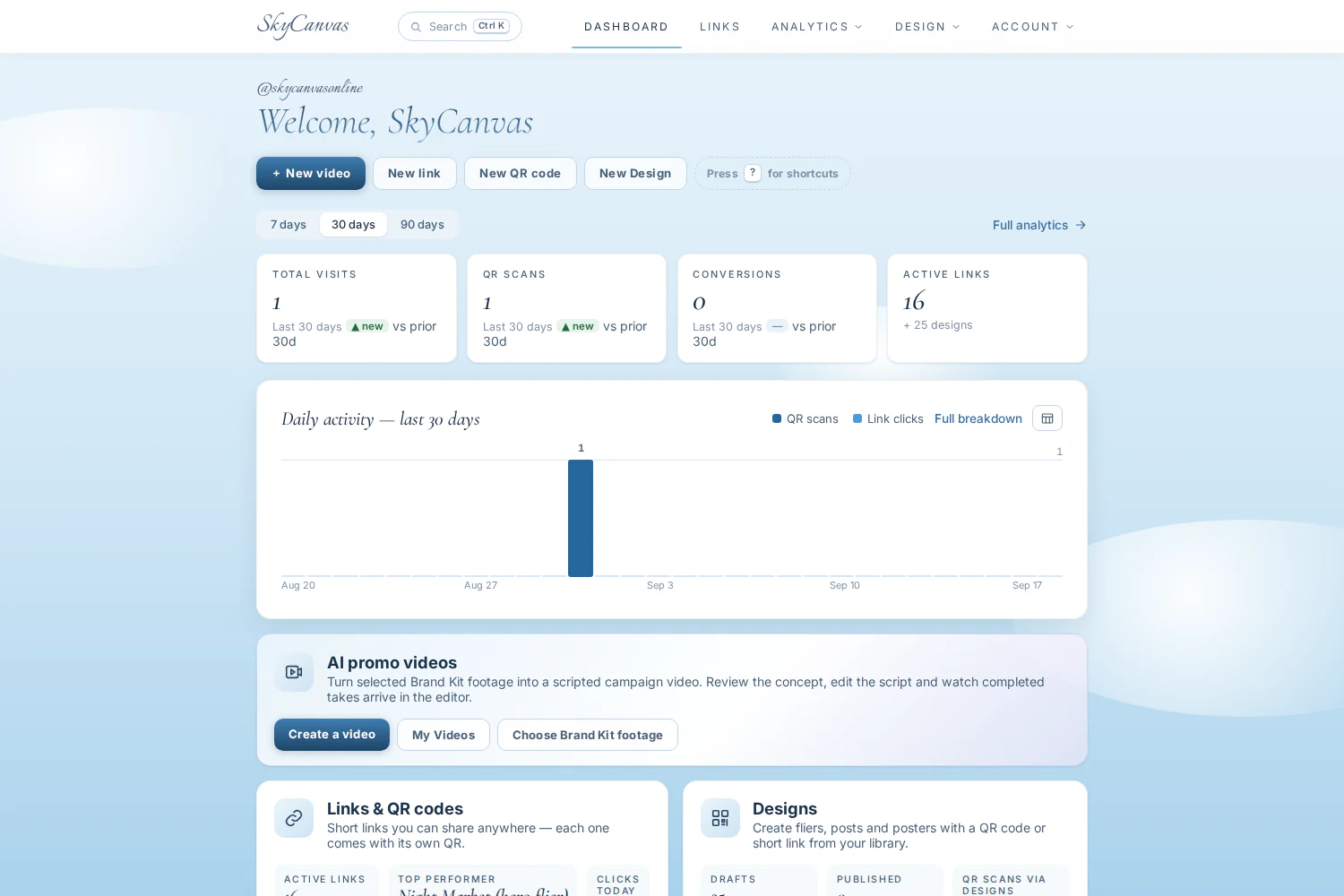
The real SkyCanvas dashboard, populated with campaigns from the admin_sky demonstration account.
One connected campaign
Why juggle five creative tools?
Your Brand Kit starts every project.
Your business profile, voice, colors, logo and analyzed footage guide both videos and designs, so each campaign begins with the same source of truth.
You can see and change the plan.
Video concepts and scripts remain editable before rendering, completed takes arrive while work continues, and AI designs stay layered instead of becoming a flat image.
Your call to action reports back.
Design QR codes and video end cards use your tracked short links. Clicks, scans, conversions and optional revenue stay connected to the campaign that earned them.
From the studio
Prompt in. Design out.
Real designs, generated from the exact sentences below. Nothing staged.
“Taco Tuesday at La Perla, half off al pastor, this Tuesday 5 to 9, scan for the menu, on a big glowing photo of tacos al pastor.”“Open mic night at Beans and Strings Coffee, Friday 7pm, free entry, musicians and poets welcome, on a moody photo background of a singer at a vintage microphone under a warm spotlight.”“Grand opening of Willow and Sage boutique, Saturday the 14th, first fifty visitors get a tote, over an elegant photo of a sunlit boutique interior.”“Yoga in the park, Sunday mornings at 9, bring a mat, first class free, with a serene sunrise park photo behind everything.”“Spring plant sale at Hilltop Nursery, April 20 weekend, rare succulents and free potting demos, on a lush greenhouse photo full of green.”“Vinyl swap meet in the Roxy basement, last Sunday of the month, buy, sell, trade, on a gritty photo background of record crates under neon light.”
The product, on film
Five features, five thirty second films
Every frame is the real product. Type a sentence and ship a design, style a code worth scanning, follow the money, post everywhere at once, and know your crowd.
AI design generationSay it. Ship it.
Type one sentence. A finished, fully editable design assembles itself, ready to print or post.
Styled QR codesWorth scanning
Six dot styles, gradients and your brand colors, restyled live and always scannable.
Conversion trackingFollow the money
One tiny snippet on your site ties every signup and sale back to the exact flier, link or scan.
Social publishingEverywhere at once
AI writes captions for each platform and one click posts your design to every connected account.
AnalyticsKnow your crowd
Scans vs clicks, devices, cities and campaigns, side by side and live.
How it works
From Brand Kit to finished campaign in three steps
Build your Brand Kit
Add your business details, logo, colors, references and analyzed footage once. Choose a tracked short link for the campaign call to action.
Choose video or design
Review an AI-written video concept and script, or describe a layered flier, poster or social post. You stay in control before final generation.
Publish and learn
Download the video, print the design or publish it to social media. Clicks, scans and conversions land on your dashboard as they happen.
Analytics
Numbers that make sense at a glance
A simple dashboard with the things you actually wonder about: who clicked, where they came from, which designs are working, and what it all turned into.
Clicks per link, today and over the last 30 days
Top referrers, so you know where people found you
Tracked calls to action across designs and video end cards
Conversions and revenue, so you know which link actually sells
skyc.online/summer-saleLast 12 days
Clicks
318
QR scans
127
Conversions
23
FAQ
Common questions, answered
Is SkyCanvas free to use?
Yes. Creating an account is free and gives you access to your Brand Kit, design studio, video workspace, short links, QR tools, public profile and analytics. Video generation is subject to the limits shown in the product.
How does the AI promo video generator work?
Choose analyzed footage from your Brand Kit, select an optional design and a tracked link, then review the AI-written concept and scene-by-scene script. Completed takes appear in the editor as they finish, and you can stop, edit and continue before downloading the final cut.
Can I customize how my QR code looks?
Fully. Pick solid colors or gradients (vertical, horizontal, radial, square), choose dot shapes like rounded, circle or bars, set a transparent background, and tune the error-correction density so it scans even when partly covered.
What does the AI design studio actually do?
Describe the design you want, like a flier, poster or social post, and the AI lays it out as real, editable layers: headline, text, shapes, a photo background and your QR code. Move, restyle or delete any piece afterwards, or ask the AI for targeted changes.
Can the AI match my brand?
Yes. Point SkyCanvas at your website and it pulls your tagline, services and brand colors for review; upload your logo once and the AI places it in your designs. You can also attach reference images for style.
Do short links track clicks and QR scans?
Every short link counts clicks with daily history and top referrers. QR codes in designs and video end cards use tracked links, so you can see which campaign actually converts.
Can SkyCanvas tell me when a scan turns into a sale?
Yes. Turn on conversion tracking for a link and paste a small snippet on your website. When a visitor arrives through your link or QR code and then signs up or buys, the conversion shows up in your analytics, with the sale amount if you choose to report it. The snippet is tiny and privacy-friendly: no cookies, no personal data, and it does nothing for visitors who didn't come through your link.
What is a .sky file?
A portable project file. Export any design as .sky to keep a local copy of the full layered design, then import it later on any account and keep editing where you left off.
The sky isn't the limit. It's the canvas.
Your first video or design starts with the brand you already built.